Windows 10 & 11 — Free & Open Source

Automate Your Desktop with Smart Rules & Fences

Stop arranging icons manually. Keep your desktop clean forever with intelligent auto-sorting, regex-powered rules, and persistent layouts.

0.1%
CPU Usage
100%
Free

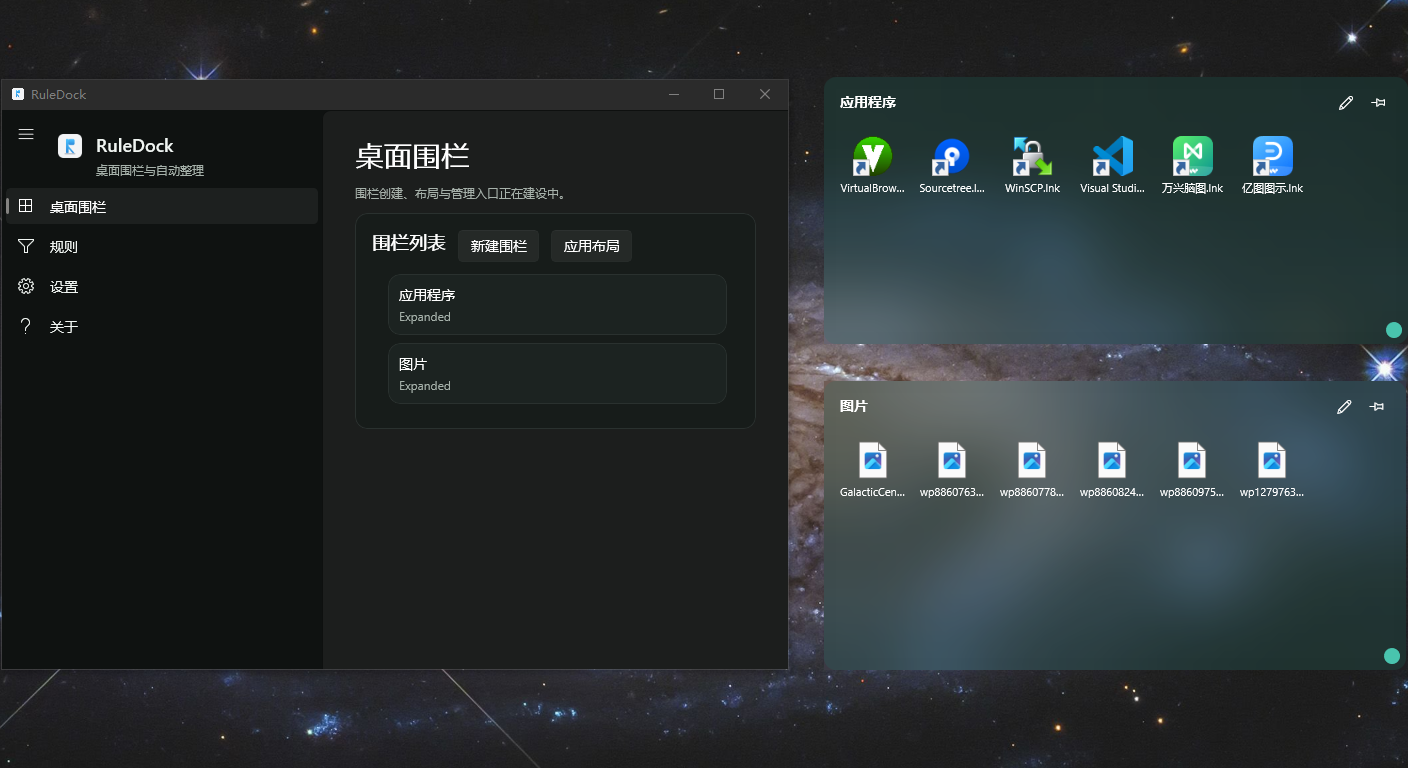
RuleDock Desktop Screenshot - Organized Fences
RuleDock Rule Engine Interface

Your Desktop Deserves Better

Tired of desktop chaos? Icons scattering after every restart? RuleDock solves these problems once and for all.

Icons Moving After Restart?

RuleDock's persistent layout engine saves your exact icon positions to SQLite and restores them even after Explorer crashes or system reboots.

Multi-Monitor Madness?

Connect or disconnect displays without losing your layout. Our smart coordinate system handles DPI changes and resolution switches gracefully.

Manual Sorting Wastes Time?

Set up rules once, and RuleDock automatically sorts new files into the right fences. Use simple keywords or powerful regex patterns.

Everything You Need for a Clean Desktop

From basic fences to advanced scripting, RuleDock scales with your needs.

Foldable Fences

Create resizable containers for your icons. Double-click to collapse and reclaim desktop space. Pin fences to prevent accidental moves.

Learn more →

Smart Rule Engine

Define rules using file extensions, name patterns, paths, or full regex expressions. RuleDock evaluates them in priority order.

Learn more →
</>

DSL Expressions

Power users can write conditions like ext in ['.png', '.jpg'] and path contains 'Design' for complex sorting logic.

View DSL Guide →

Layout Persistence

SQLite-backed storage ensures your layouts survive anything. Export and import configurations across machines.

Learn more →

Explorer Recovery

When Windows Explorer restarts, RuleDock automatically reconnects and restores your desktop layout within seconds.

Customizable Appearance

Adjust fence transparency, colors, and borders. Create a desktop that matches your style while staying functional.

Rules as Powerful as Your Imagination

RuleDock's DSL lets you express complex sorting logic in readable expressions.

Rule Examples (DSL Syntax)
# Sort images to "Design" fence
ext in ['.png', '.jpg', '.psd'] and path contains 'Design'

# Match project files with regex
name matches /^project_\d{4}\.zip$/i

# Combine multiple conditions
ext == '.exe' or ext == '.msi'

# Exclude certain paths
ext == '.txt' and path != 'C:\Windows'

Want to learn the full DSL syntax? Read the Rule Engine Guide →

How RuleDock Stacks Up

See why developers and power users choose RuleDock over alternatives.

Feature RuleDock Stardock Fences Nimi Places
Price Free $9.99+ Free
Foldable Fences
Regex Rule Support
DSL / Expression Rules
SQLite Persistence
Explorer Crash Recovery Partial
Multi-Monitor DPI Handling Partial
Windows 11 ARM64

Read Full Comparison →

Ready to Clean Your Desktop?

Download RuleDock and experience the difference. Setup takes less than a minute.

v0.5.0 · Windows 10 (1903+) and Windows 11 · No subscription required